 Sealkeep
How to hide photos and videos on iPhone in an encrypted vault
Sealkeep lets you move photos and videos out of your photo library and into an encrypted vault on your iPhone, then delete the originals in one step. Inside the vault you get albums, favorites and a full-screen viewer, and every photo, video and thumbnail is encrypted with AES-256-GCM. Free covers up to 50 items; Sealkeep Pro removes the limit.
Hidden album or encrypted vault: the difference
iPhone already has a way to hide photos: the Hidden album in Photos. It takes photos out of your main library view and can be locked behind Face ID. It is a good, built-in option when your goal is to keep photos out of sight while they stay in your photo library.
Sealkeep does something different. It makes an encrypted copy of each photo or video inside its own vault, separate from your photo library, and then offers to delete the originals. After that, the photo is no longer in Photos at all. It exists only as ciphertext in Sealkeep's private storage, readable with your Sealkeep passcode, pattern or Face ID.
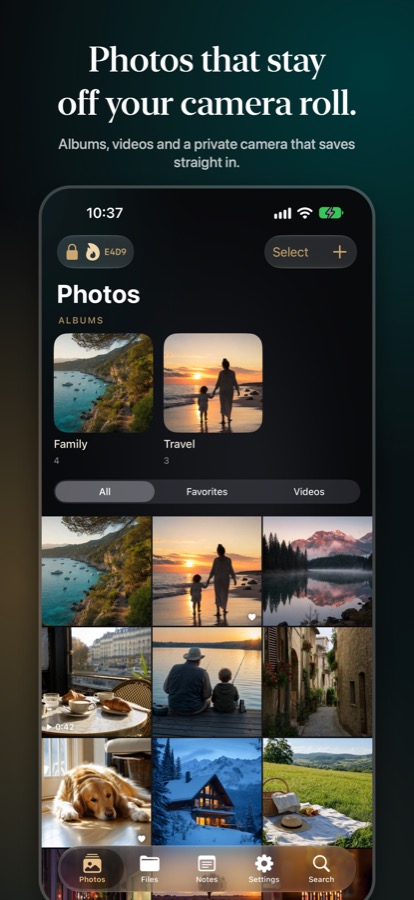
Inside the vault, photos are grouped in a Photos tab with All, Favorites and Videos filters, shown in a three-column grid with the newest first.
How it works under the hood
Import without Photos access. Import from Photos uses the system photo picker, which runs outside Sealkeep. You pick photos and videos there, as many as you like, and only those items are handed to Sealkeep. The app doesn't need permission to read your photo library to import.
Original quality. Sealkeep asks for the original file, not a compressed version, and encrypts those bytes unchanged. It keeps the original capture date when one is available; otherwise the import time is used.
Encryption. Each item is encrypted with AES-256-GCM under the vault's random 256-bit key, sealed in 1 MiB chunks so tampering or truncation is detected. Sealkeep also makes a small thumbnail (at most 480 pixels) for the grid, and encrypts that too. Item names, dates, album names and favorites live in the vault's encrypted index. Decrypted thumbnails are cached in memory only and cleared when the vault locks.
Playback. To play a video, Sealkeep decrypts it to a temporary file that is excluded from backups and wiped every time the vault locks and at every launch. Videos play even with the Silent switch on.
Organize photos inside the vault
- Albums. Create one with New album. From the album menu you can Rename it or Delete album, choosing Delete album and its photos or Delete album, keep photos. Long-press and drag to reorder albums. The cover is always the newest item.
- Favorites. Tap the heart in the viewer, or use Add to Favorites from the context menu.
- Blur album. Choose Blur album from the album menu. Its thumbnails are blurred and marked with an eye-slash, and in the viewer each item stays blurred behind Tap to show until you tap, and is hidden again when you swipe away. This is a guard against someone glancing at your screen, not an extra layer of encryption.
- Viewer. Swipe between items, pinch to zoom, double-tap to zoom in, and tap to hide the controls. Buttons let you favorite, share, move to an album or delete, and the date and time are shown.
- Select. Tap Select to pick several items, then Save to Photos, Move or Delete.
What it protects against
- Someone scrolling through your photo library. Once the originals are deleted and Recently Deleted is emptied, the photos are no longer in Photos.
- Someone using your unlocked iPhone. The vault has its own lock: Six digits, a Custom passcode (6 or more characters) or a Pattern (4x4 grid, 6 or more dots), with optional Face ID or Touch ID. From the 5th wrong passcode, lockouts escalate from 30 seconds up to 1 hour per attempt.
- Someone reading the files on disk. Photos, videos, thumbnails and their names are stored encrypted. Without the vault key they are unreadable.
- Glances at your screen. The app switcher shows only the Sealkeep logo, the vault is covered while the screen is being recorded, and blurred albums keep thumbnails unreadable.
What it does not protect against
- Originals you keep. If you choose Keep them, the originals stay in your photo library, and in any sync of that library, exactly as before.
- Recently Deleted. Deleted originals stay in Recently Deleted for 30 days. Empty it if you want them removed completely.
- Metadata. Sealkeep does not strip EXIF data. Location and camera details in the original stay inside the encrypted copy, and travel with any copy you export.
- Exports. Save to Photos creates a normal, unencrypted copy in your library, as the confirmation says: "The copy won't be encrypted." Share hands a decrypted copy to another app.
- Screenshots. They are not blocked or detected.
- Forgetting your passcode and recovery key. Without either, the vault can't be opened. Nothing auto-erases after wrong attempts, but nothing can bypass the encryption either.
- Searching by name. Photos imported from your library get a random name, not their original file name, so you won't find them by name in Search.
How to hide photos and videos
- Open Sealkeep and unlock your vault.
- Go to the Photos tab, tap + and choose Import from Photos.
- Select the photos and videos you want to hide, then confirm.
- When Sealkeep asks Delete the originals from your photo library?, tap Delete originals. iOS shows its own confirmation and asks for permission to change your library.
- Open the Photos app and empty Recently Deleted if you want the originals gone right away.
Other ways in: take new photos with the Private camera so they never reach your camera roll, use Paste, or share from another app through the share sheet. See Import from anywhere.
Free and Pro
Importing, albums, favorites, blurred albums and the viewer are all in the free version, up to 50 items per vault. Sealkeep Pro removes the limit and adds hidden vaults and encrypted iCloud backup of your primary vault.
Questions
How do I hide photos on iPhone without them showing in the Photos app?
Import them into Sealkeep with Import from Photos, then tap Delete originals when asked. After you empty Recently Deleted, the photos exist only as encrypted copies in Sealkeep.
Does Sealkeep need access to my photo library?
Not to import. The system photo picker hands Sealkeep only the items you choose. If you tap Delete originals after an import, Sealkeep asks for read-write access so it can remove them, and iOS shows its own confirmation.
Is it better than the Hidden album in Photos?
They do different jobs. The Hidden album keeps photos in your library but out of the main view. Sealkeep moves them out of the library into a separately encrypted vault with its own passcode, so they no longer exist in Photos once the originals are deleted.
Does Sealkeep reduce photo quality?
No. It imports the original file and encrypts those bytes unchanged. Only the grid thumbnail is a smaller copy, and it is encrypted too.
Does Sealkeep remove location data from photos?
No. Metadata, including location, is kept inside the encrypted copy. It is protected while it stays in the vault, but exported copies carry it.
Can I hide videos too?
Yes. Videos import the same way, appear under the Videos filter, and play from a temporary decrypted file that is wiped when the vault locks.
Related
Private camera
Take photos and videos inside Sealkeep. They are encrypted with AES-256-GCM into your vault and never saved to your camera roll. Free, up to 50 items.
Encryption
Sealkeep encrypts photos, videos, files, thumbnails and notes with AES-256-GCM on iPhone or iPad, with a key protected by 1,000,000 PBKDF2 rounds. No servers.
Hidden vaults
Give a second passcode its own hidden vault with separate photos, files and notes. Each vault has its own key, and the app never shows how many vaults exist.